Why App Blockers Don’t Work
By Dom · · 10 min read
You set a thirty-minute limit on Instagram. On Tuesday at 8:40pm the limit screen appears, and you tap through it without really deciding to. The whole system took about four seconds to defeat, and the part of you that set it up in the first place was not consulted.
That experience is close to universal, and it is worth saying plainly: it is not a character problem. The published research on this whole category of app is far less flattering than the App Store listings suggest, and the thing that does work is not the wall.
Key takeaways
- Blocking is the feature people buy and not the one the evidence supports. A 2023 review in the Journal of Medical Internet Research found the strategies that reduced phone use were grayscale mode, app limits and mixed interventions — blocking was not among them.
- What worked best in a controlled test was being offered a way out. In a preregistered experiment with 500 people, giving users an explicit option to abandon the app-opening had the strongest effect; a short delay helped; a persuasive message did nothing.
- Small friction beats a hard wall. A field study of 280 people over six weeks found a one-second pause cut actual app openings by 57%.
- Taking a break from the intervention is normal. A longitudinal study of 1,039 users found people pause these tools periodically and rebound quickly afterwards. Deleting it for a fortnight is not failure.
- A block with nothing on the other side is only a delay. The reliable pattern is friction plus a specific, decided-in-advance alternative.
What the research actually found
The most useful single paper here is a 2023 multimethod study in the Journal of Medical Internet Research by Rahmillah, Tariq, King and Oviedo-Trespalacios. The authors reviewed the scientific evidence for apps designed to reduce phone use, content-analysed 13 of them, and ran a sentiment analysis on user reviews.
Their finding on effectiveness is careful and not encouraging: it “varied from weak to strong,” and they conclude that further research is needed to evaluate app-based interventions at all. They sorted the features into seven types, and then named which strategies actually reduced phone use. Blocking was not one of them.
| Feature | How common | Named as effective? |
|---|---|---|
| Self-tracking | Among the most used | No |
| Goal setting | Among the most used | No |
| Blocking | Common | No |
| App limits | Common | Yes |
| Simplification (e.g. grayscale) | Less common | Yes |
| Gamification | Least used | No |
| Assessment | Least used | No |
There is an uncomfortable pattern in that table. The two features almost every one of these apps leads with — a dashboard telling you your screen time, and a goal you set for yourself — are the two with the least support behind them. Users tolerated the apps well enough; the review put sentiment scores between 61 and 86 out of 100. Liking a tool and being changed by it are different measurements.
The experiment that shows what does work
In 2023, Grüning, Riedel and Lorenz-Spreen published a study in PNAS on a self-nudging app that does something much smaller than blocking. When you open a chosen app, it interrupts with a pop-up: a short waiting delay, a line of text, and a button to abandon the attempt.
In a field experiment with 280 participants over six weeks, two things happened. On 36% of attempts, people closed the app again after the interruption. And across the six weeks, they tried to open those apps 37% less often than in the first week. Combined, actual openings fell by 57%.
The follow-up is the part worth memorising. In a preregistered online experiment with 500 people, the authors separated the three ingredients to see which one was carrying the effect:
- The option to dismiss the attempt — the strongest effect by a clear margin.
- The friction of a short time delay — also reduced consumption.
- The deliberation message — not effective.
Read that against the design of a typical blocker. A blocker removes the option and delivers a message. The evidence says the option was the active ingredient and the message was the inert one. It is close to being exactly backwards.
What happens over months, not weeks
Six weeks is short. Haliburton and colleagues followed this up at CHI 2024, analysing organic usage data from 1,039 real users of the same app over an average of 13.4 weeks, plus survey responses from 249 of them.
Two findings stand out. The frictions kept working over the long run: users attempted to open target apps less often, and the openings that remained became more intentional. And — this is the one nobody puts on a landing page — users took periodic breaks from the intervention, then rebounded quickly from overuse when they came back.
That rebound is the weak point of any break that only subtracts, and it is why planning a phone fast around its replacement matters more than choosing its length.
So the fortnight you spent with the blocker switched off is documented behaviour, not a relapse. That reframing matters more than it sounds, because the belief that a lapse has ruined the attempt is what turns a two-week break into permanent deletion. The same dynamic shows up in reading and prayer habits, which is why why streaks make people quit argues for building the gap into the design instead of punishing it.
Four reasons the blocker got deleted
Ninety-one percent of US adults own a smartphone, according to the Pew Research Center’s mobile fact sheet from its February–June 2025 survey, so this is a near-universal experiment being run in private. The failure modes are consistent.
- You are the administrator. Any restriction you can impose you can lift, and at 11pm the version of you doing the lifting is not the version that set it. A passcode you know is a speed bump.
- It fires at the wrong moment. Blocks trigger at a time or a total, which is rarely the moment you actually reach for the phone out of boredom. The intervention and the impulse are not aligned.
- It gives you nothing to do instead. The urge does not disappear when the app does. It relocates — usually to a different app, sometimes to the browser version of the same one.
- It treats you as the problem. A dashboard reporting that you spent five hours on your phone is an accusation with no next step attached, and people quite reasonably stop opening things that scold them.
The third one is the load-bearing failure. A block creates a gap in your evening and does not fill it, and an unfilled gap gets filled by the nearest available thing. How to stop doomscrolling goes deeper on the loop itself, and why screen time is a spiritual problem rather than a productivity one is about why the productivity framing keeps producing tools like these.
The honest part, about the app I work on
The full mechanic, including the settings that make it gentler and the places it does not work at all, is written out in our explainer on the reading gate.
I work on BlessUp, which uses Apple’s Screen Time framework to shield apps you choose until you have read the day’s chapter. That puts it squarely inside the category this article is criticising, and it would be dishonest to run the evidence above and then exempt ourselves from it.
So: the same findings apply. A shield you control is a shield you can lift. If the reading were dropped from the design, what remained would be a wall, and the research says a wall on its own is weak.
What the design bets on is the two things the evidence did support. There is friction at the moment of reaching, rather than at an arbitrary hour. And there is a specific, finite, decided-in-advance alternative on the other side of it — today’s chapter, about nine minutes, already chosen so no decision is required. Whether that combination outperforms a plain blocker over a year is a bet informed by the research, not a result the research has proved. Nobody has run that trial, and anyone claiming otherwise about any app in this category is overstating what exists.
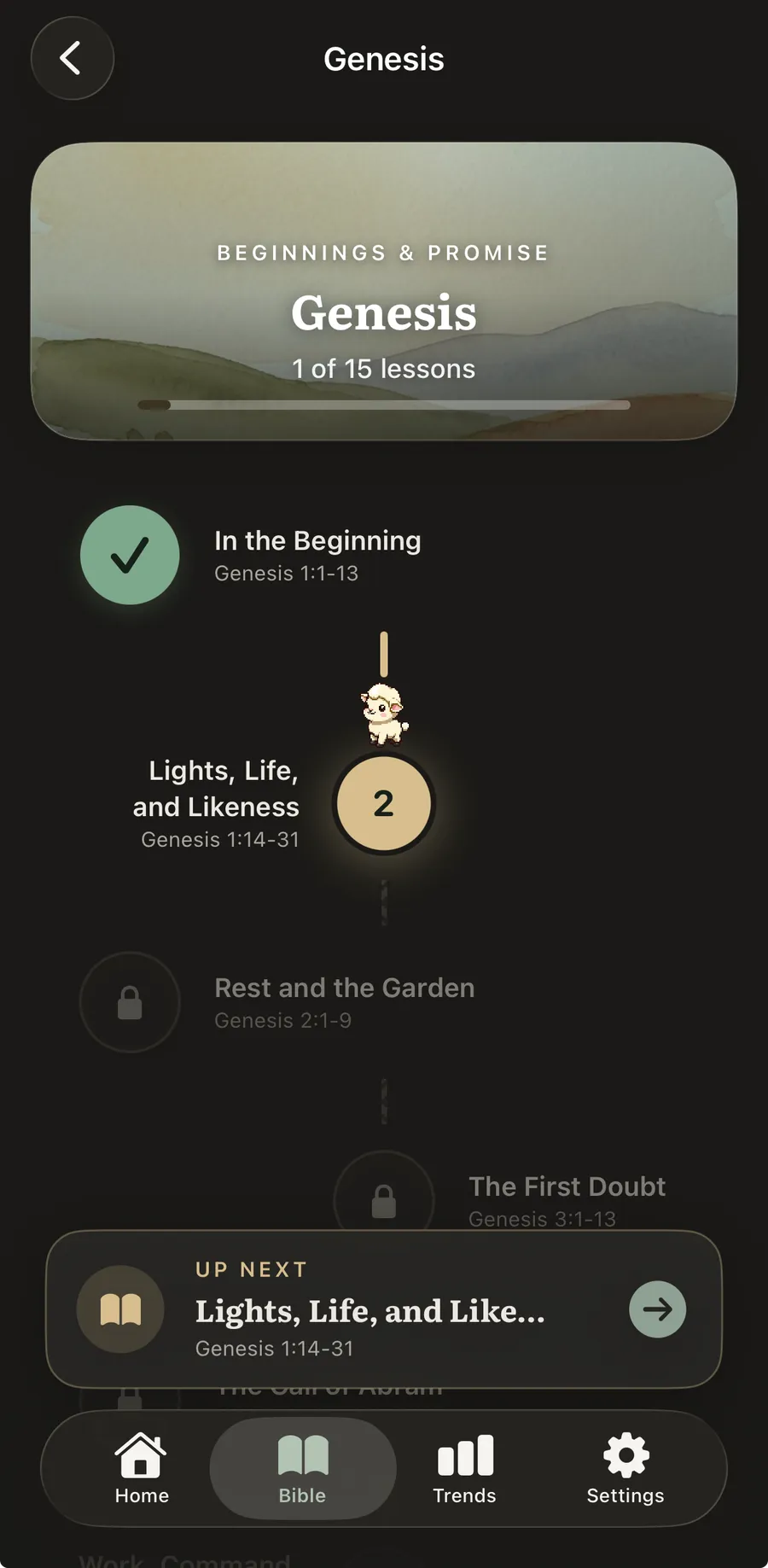
If the pattern you recognise is deleting the blocker after a fortnight, the missing piece is almost certainly the destination rather than the discipline. BlessUp shields the apps you pick and hands you one specific way through: read the day’s chapter, which is already waiting and takes about nine minutes. Miss a day and a grace day covers it, because a tool that punishes the gap is a tool you will eventually delete. See how the reading gate works.
What to do instead, whatever tool you use
If you want that worked through hour by hour, we have mapped a boundary for each part of the day, with a two-question test for deciding which apps need one at all.
All of this is actionable without installing anything new.
- Turn the screen grayscale. The JMIR review named it among the strategies that worked, it is built into iOS and Android accessibility settings, and it is free. Colour is a large part of what makes a feed feel urgent.
- Use limits on two apps, not on everything. App limits were the other named-effective strategy. Broad restrictions get switched off wholesale; two specific ones survive.
- Decide the alternative in advance. Write down what you will do when the block appears — a chapter, ten pages, a walk, a phone call. “Not this” is not a plan.
- Add a pause, not a wall. Anything that puts a few seconds and a visible way out between the reach and the feed is doing the thing that measured best.
- Expect breaks and plan the return. The longitudinal data says people pause and come back. Decide now what coming back looks like, so the decision is not made at the low point.
If you want the version of this built around Scripture specifically, the best Christian app blocker for iPhone compares what is available, and the BlessUp FAQ covers the mechanics of shielding on iOS, including why an Android version is not possible on this architecture.
The underlying instinct in Matthew 6:33 — “seek first his kingdom” (NIV) — is about order rather than prohibition. Which is roughly what the research keeps finding, in much duller language: what you put first matters more than what you forbid.
Frequently asked questions
Do app blockers actually work?
The evidence is mixed and weaker than the marketing implies. A 2023 review in the Journal of Medical Internet Research found effectiveness across this category ranged from weak to strong, and named grayscale mode, app limits and mixed interventions as the strategies that reduced phone use. Blocking itself was not among them, despite being one of the most common features.
Why do I keep turning my app blocker off?
Because you hold the passcode, the block usually fires at a time rather than at the moment you actually reach for the phone, and it removes an option without supplying another one. The urge does not end when the app closes; it moves to whatever is nearest, which is often a different app or the browser version of the same one.
What works better than blocking?
A short pause with a visible way out. In a PNAS field experiment with 280 people, a one-second interruption cut actual app openings by 57% over six weeks, and a follow-up experiment with 500 participants found the strongest single ingredient was giving people an explicit option to abandon the attempt. The persuasive message had no measurable effect.
Is it bad that I stopped using my blocker for a while?
No, and it is well documented. A study of 1,039 users of a friction app over an average of 13.4 weeks found people routinely take breaks from these interventions and then rebound quickly from overuse when they return. Treating a pause as a permanent failure is what usually turns it into one.
Does Apple Screen Time count as an app blocker?
Yes, and it has the same structural weakness: you set the limits and you can lift them from the limit screen itself. Its app limits feature is one of the strategies the JMIR review did name as effective, so it is worth using, but it works best on two or three specific apps rather than applied across everything.
Your phone can start opening the Bible instead of closing it.
No guilt. Ever. Grace is built in. Funded by readers, never by ads.